FxPro withdraw

Submit and track a payout from the FxPro client area by selecting the account, entering the amount, choosing the payout destination, and confirming the request; you’ll receive a withdrawal ID to monitor progress. Most requests undergo compliance checks before release — smaller e-wallet and card payouts are usually faster while international bank transfers take longer and may involve third‑party fees. If a request remains pending beyond typical processing windows, check for document requests, mismatched beneficiary details, or deposit-source rules, and contact support with the withdrawal ID to resolve delays.

Withdrawal rules
Withdrawals are available 24/7, giving you constant access to your funds. To withdraw, visit the Withdrawal section in your FxPro Wallet, where you can also check the status of your transaction under Transaction History.
However, keep in mind the following general rules for withdrawals:
-
The maximum withdrawal amount is 15,999.00 USD (this is applied for all the withdrawal methods).
-
Kindly be informed that to withdraw via the Bank Wire method, you should first refund all your recent Credit Card, PayPal, and Skrill deposits. The funding methods that need to be refunded will be clearly displayed to you in your FxPro Direct.
-
Please note that for the withdrawal to be successful, you should transfer your funds to your FxPro Wallet. For the method using Bank Cards and Cryptocurrencies, the withdrawal amount must be equal to the deposit amount, while the profit will be automatically transferred via Bank Transfer.
-
You must follow our withdrawal policy which instructs that clients must withdraw via the same method used to deposit unless that method has been fully refunded or refund limits have expired. In this case, you may use a bank wire method, or an e-wallet previously used to fund (as long as it can accept payments) to withdraw profits.
-
FxPro does not charge any fees/commission on deposits/withdrawals, however, you may be subject to fees from banks involved in the case of bank transfers. Please note that for e-wallets, there may be a fee for withdrawals, if you have not traded.
How to Withdraw Money from FxPro [Web]
Bank Card
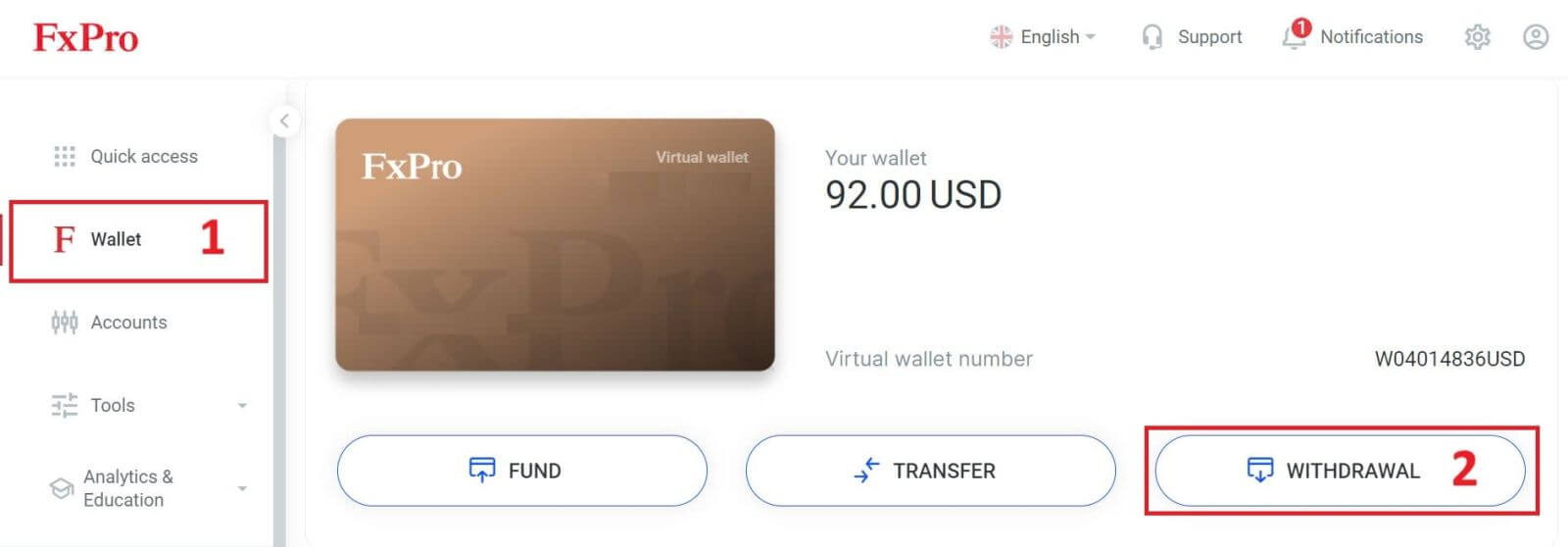
First, log in to your FxPro Dashboard. Then, select FxPro Wallet from the left sidebar and click the "Withdrawal" button to start.
Please note that we accept Credit/Debit cards including Visa, Visa Electron, Visa Delta, MasterCard, Maestro International, and Maestro UK.
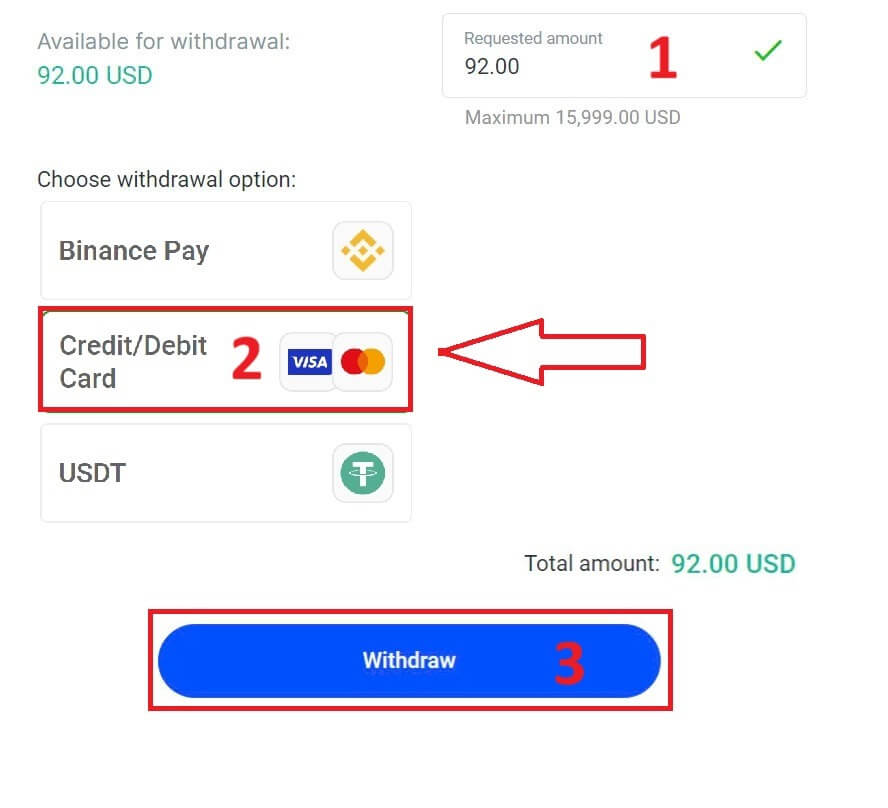
Next, enter the amount you wish to withdraw in the corresponding field. Then, select the "Withdraw" option as "Credit/Debit Card" and click the "Withdraw" button to continue.
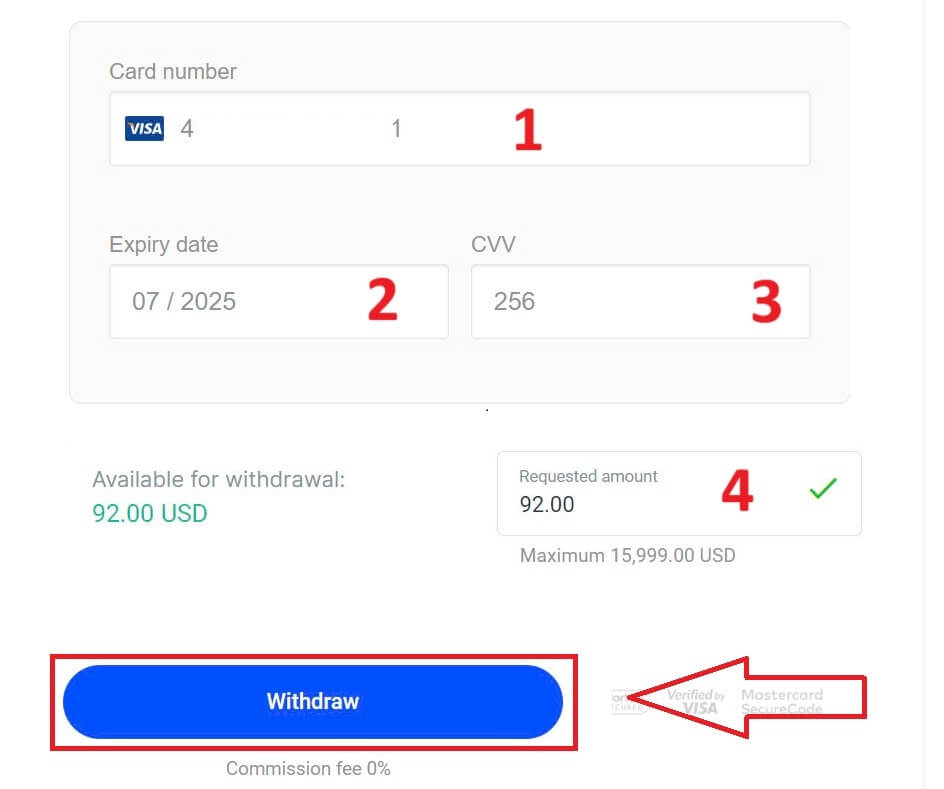
Next, a form will appear for you to enter your card information (if you’re using the same card that you previously used to deposit, you can skip this step):
-
Card number
-
Expiry date.
-
CVV.
-
Please carefully check again the withdrawal amount.
Once you make sure every field is correct, click "Withdraw" to proceed.
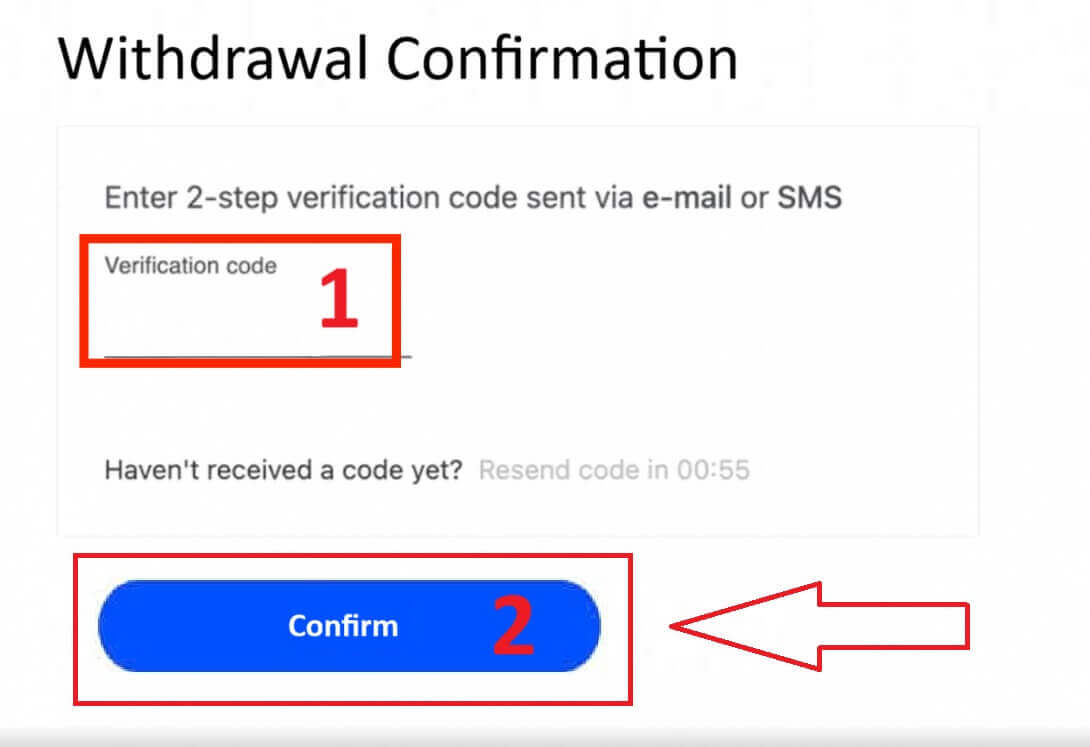
Input the verification code that was sent to you via email or SMS, and then click "Confirm".
A message will confirm the request is complete.
Electronic Payment Systems (EPS)
To get started, log into your FxPro Dashboard. Once inside, navigate to the left-hand sidebar, find FxPro Wallet, and hit the "Withdrawal" button to initiate the process.
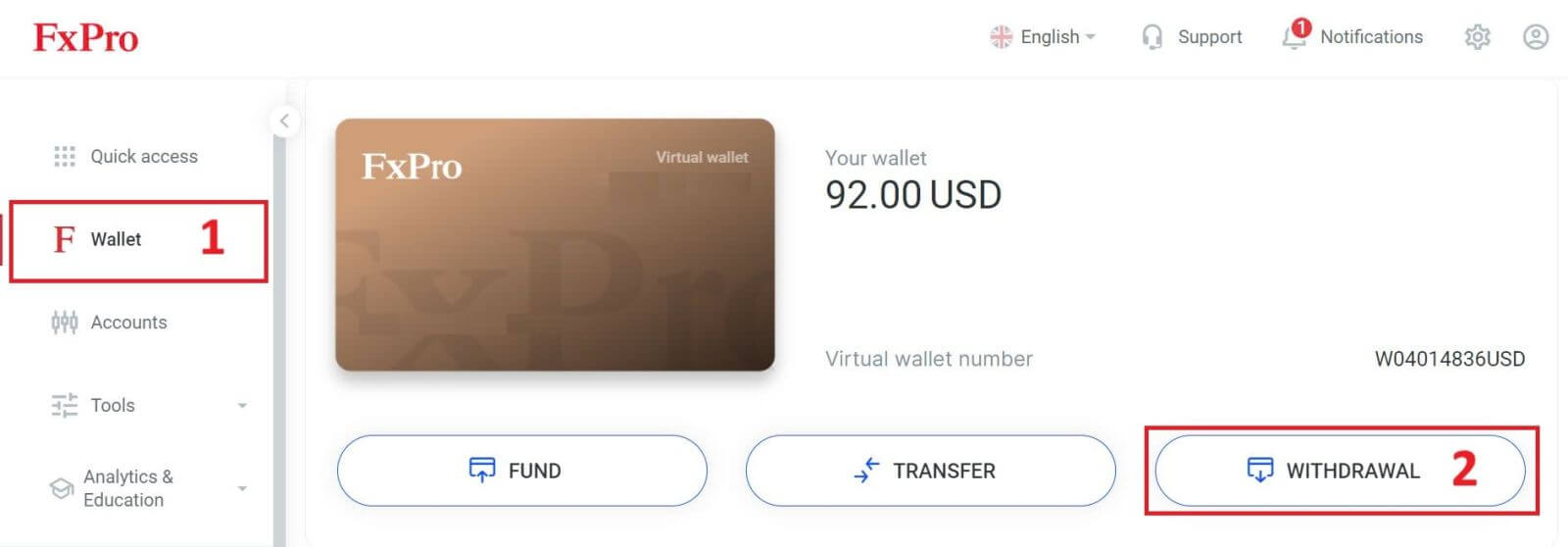
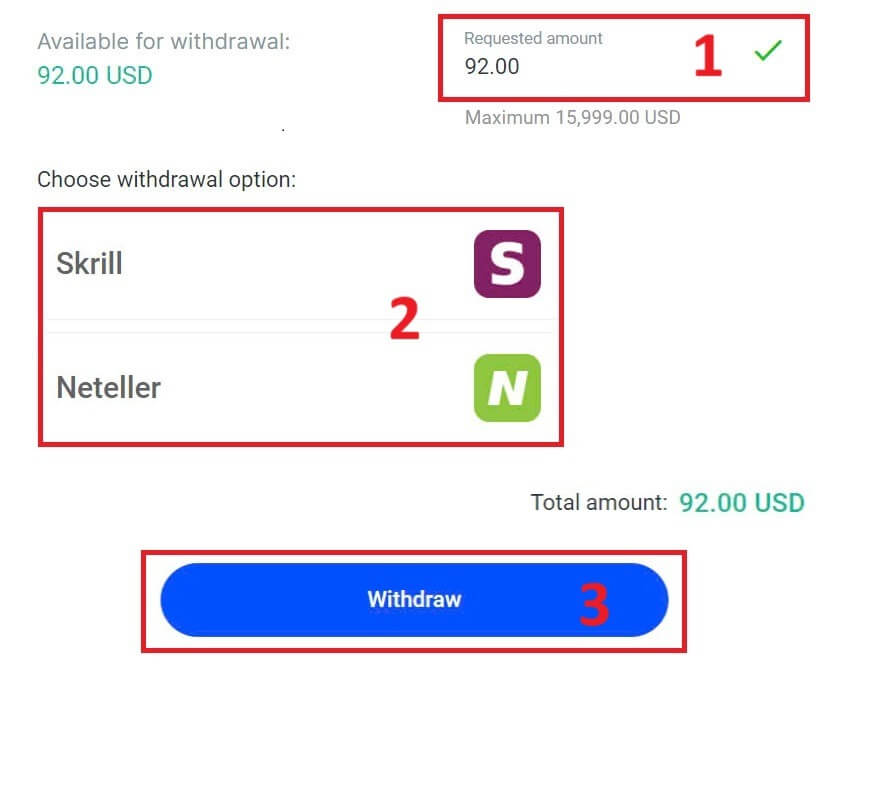
Now, input the desired withdrawal amount in the designated field. Choose one among the available EPS such as Skrill, Neteller,... as your withdrawal method, then proceed by clicking the "Withdraw" button to move forward.
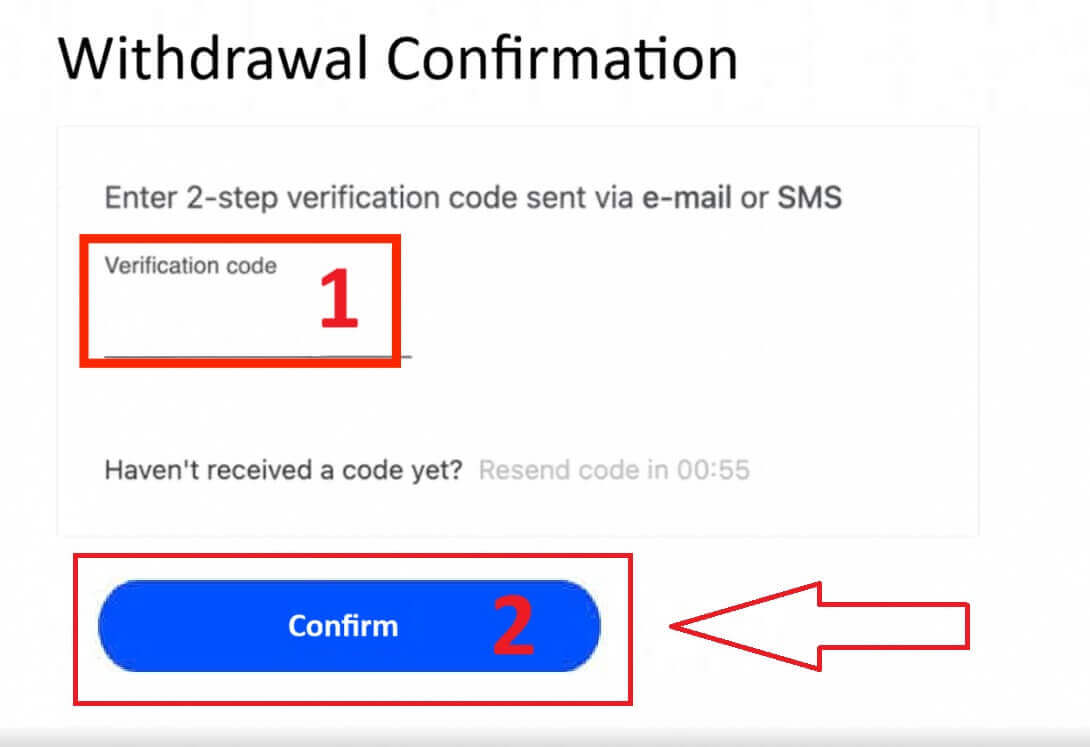
Enter the verification code you received through email or SMS, and then click "Confirm" to proceed.
Congratulations, your withdrawal will now begin processing.
Cryptocurrencies
To begin, access your FxPro Dashboard. From there, locate the left-hand sidebar, find FxPro Wallet, and press the "Withdrawal" button to initiate the withdrawal process.
Please note that the External Wallet you used for your deposit will also be the default destination for your withdrawal (this is mandatory).
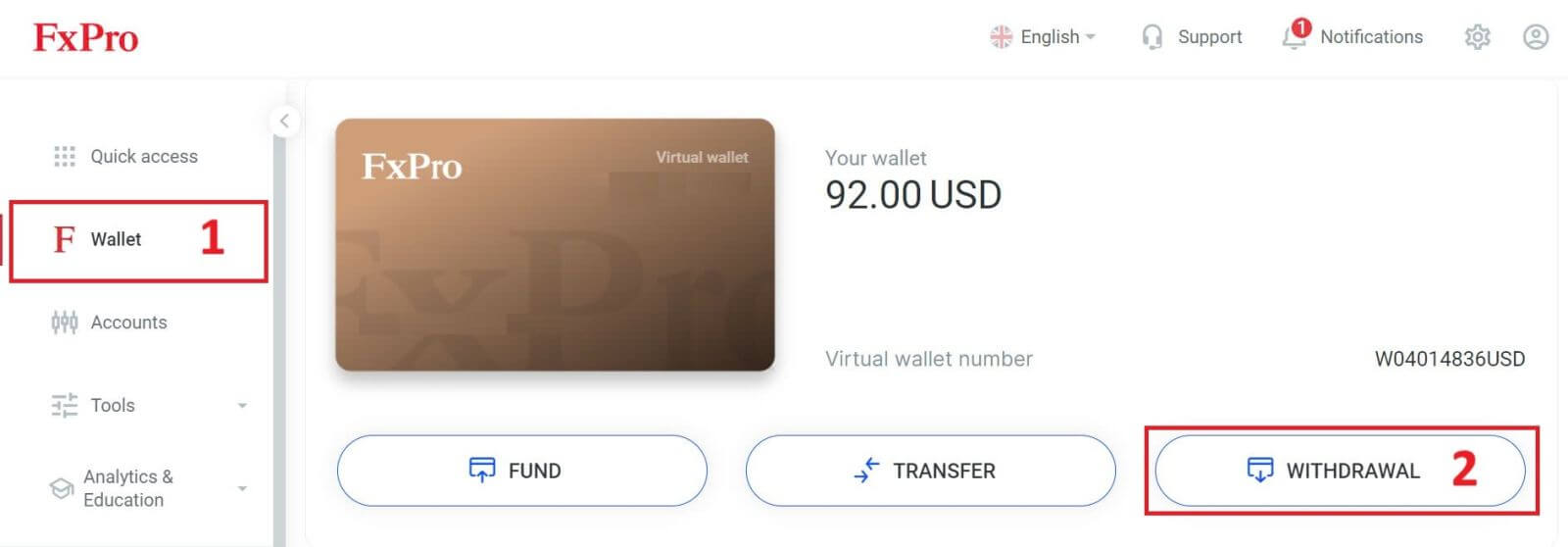
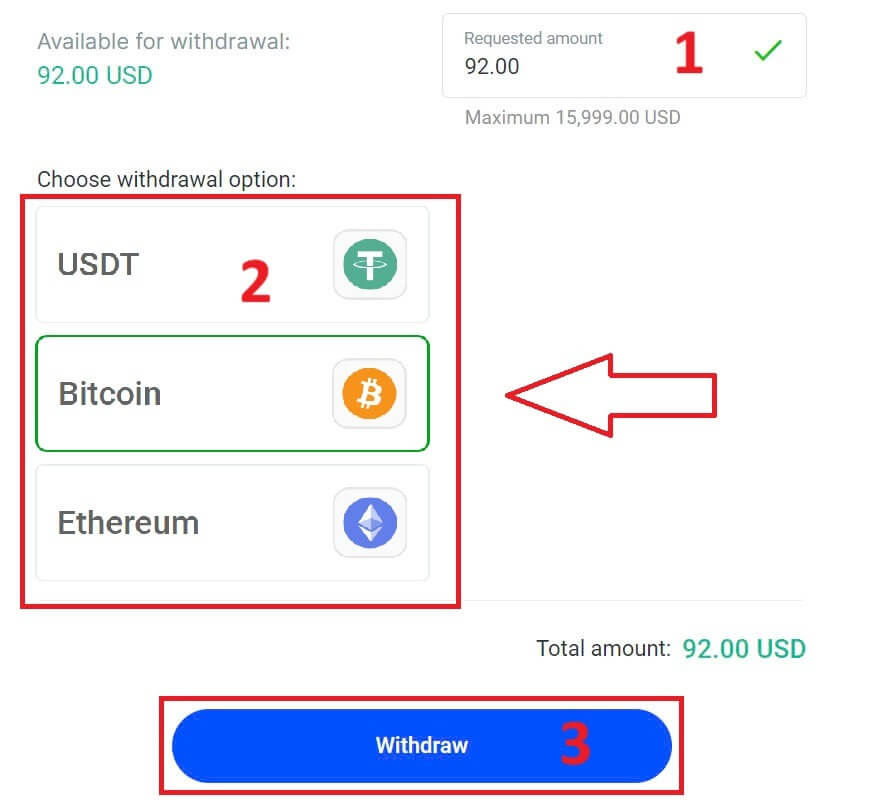
Now, enter the amount you wish to withdraw in the designated field. Select one of the available currency options like Bitcoin, USDT, or Ethereum as your withdrawal method, and then click the "Withdraw" button to proceed.
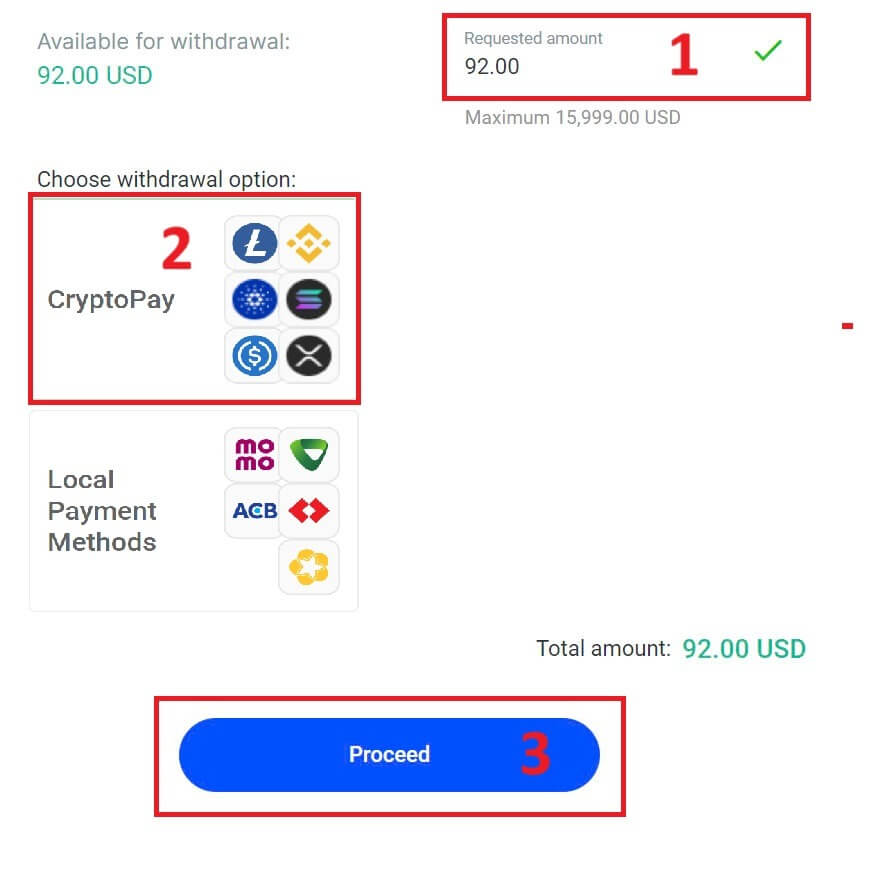
You can also refer to some other cryptocurrencies in the "CryptoPay" section. Please click "Proceed" to come to the scroll-down menu.
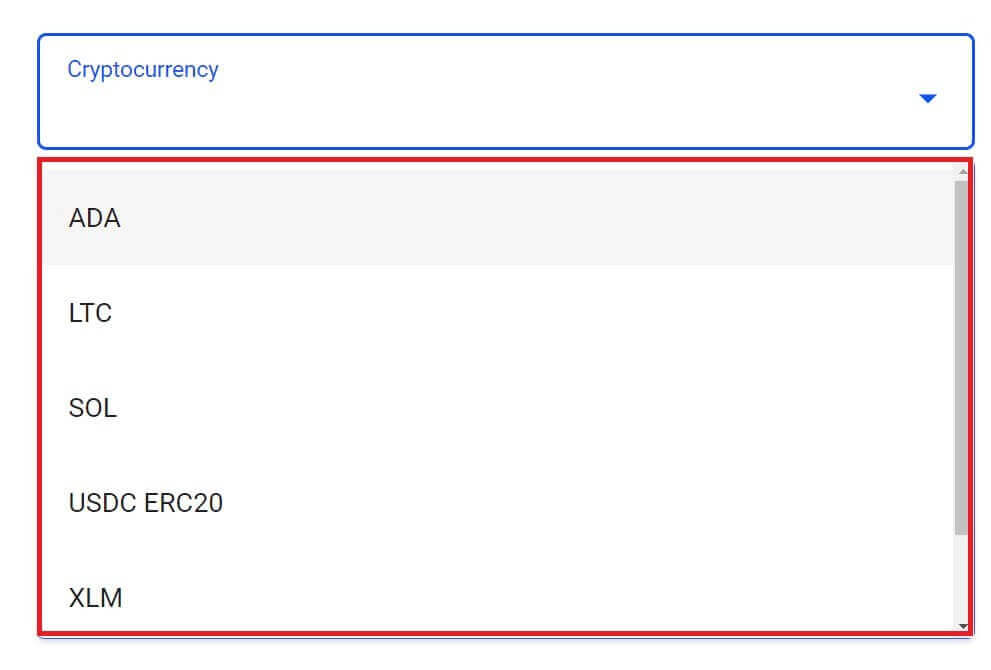
They have a variety of cryptocurrencies for you to select.
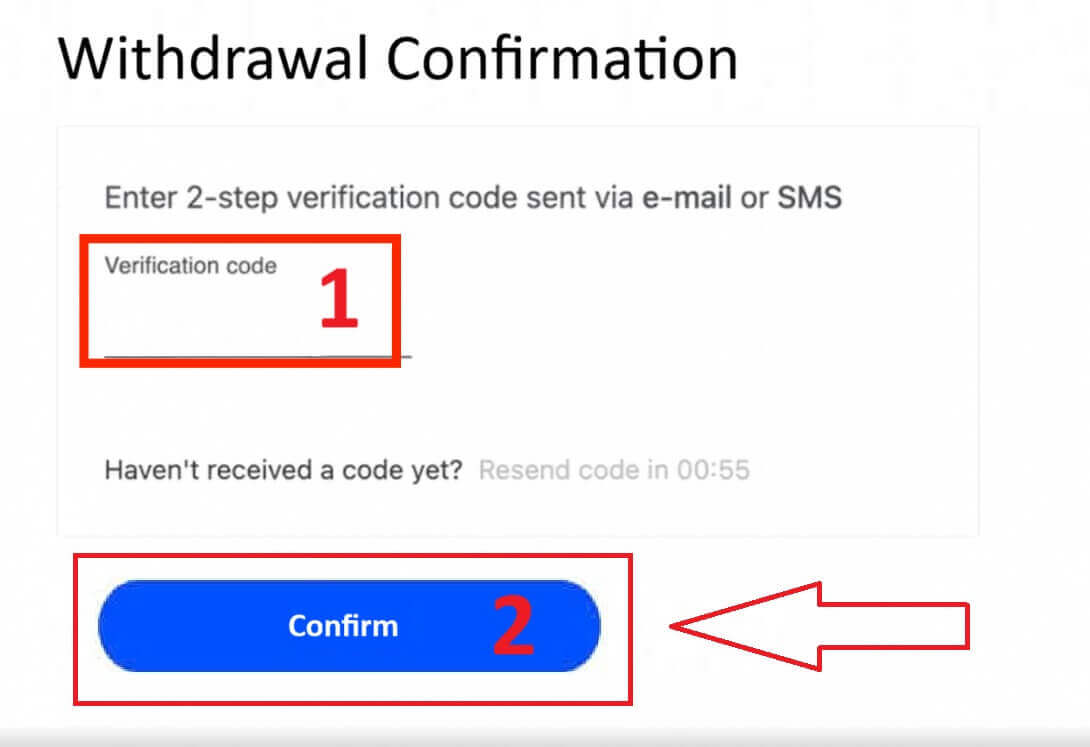
Next, please input the verification code sent to you via email or SMS, and then click "Confirm" to continue.
Local Payment - Bank Transfers
To get started, log into your FxPro Dashboard. Once inside, navigate to the left-hand sidebar, find FxPro Wallet, and hit the "Withdrawal" button to initiate the process.
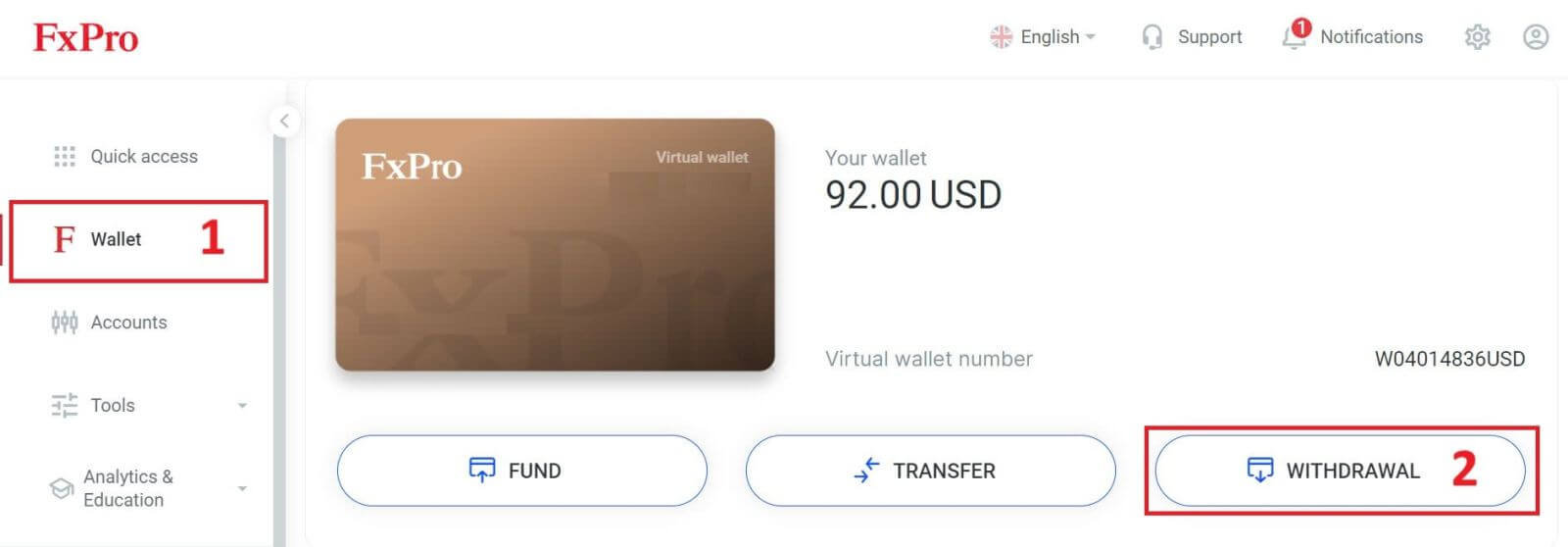
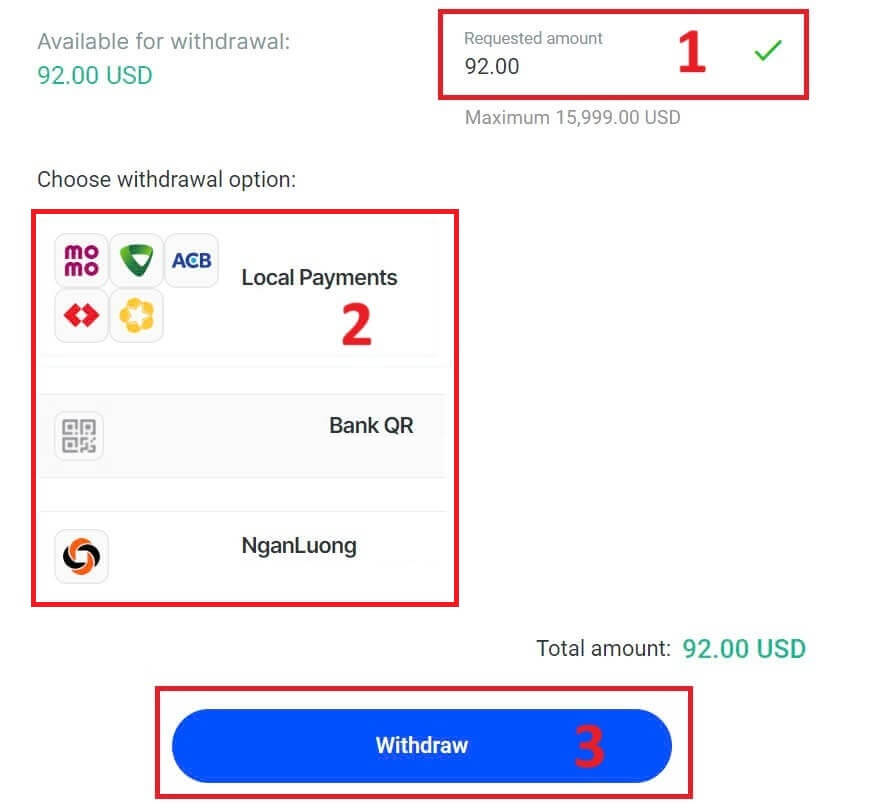
Now, input the desired withdrawal amount in the designated field. Choose one among the available options in Local Payment or Bank Transfer as your withdrawal method, then proceed by clicking the "Withdraw" button to move forward.
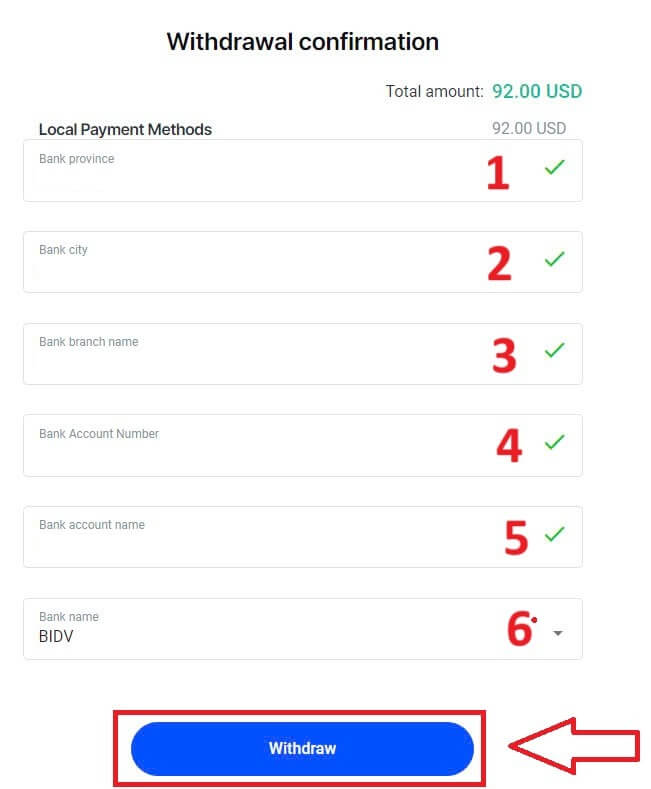
On the next page, a form will appear for you to fill in (if you chose the bank details same as the one you used to deposit, you can skip this form):
-
Bank Province.
-
Bank City.
-
Bank Branch Name.
-
Bank Account Number
-
Bank Account Name.
-
Bank Name.
Once you complete the form as well as make sure every field is correct, please finish by clicking the "Withdraw" button.
A final screen will confirm that the withdrawal action is complete and the funds will be reflected in your bank account once processed.
You can always track the transaction status in the Transaction History section.
How to Withdraw Money from FxPro [App]
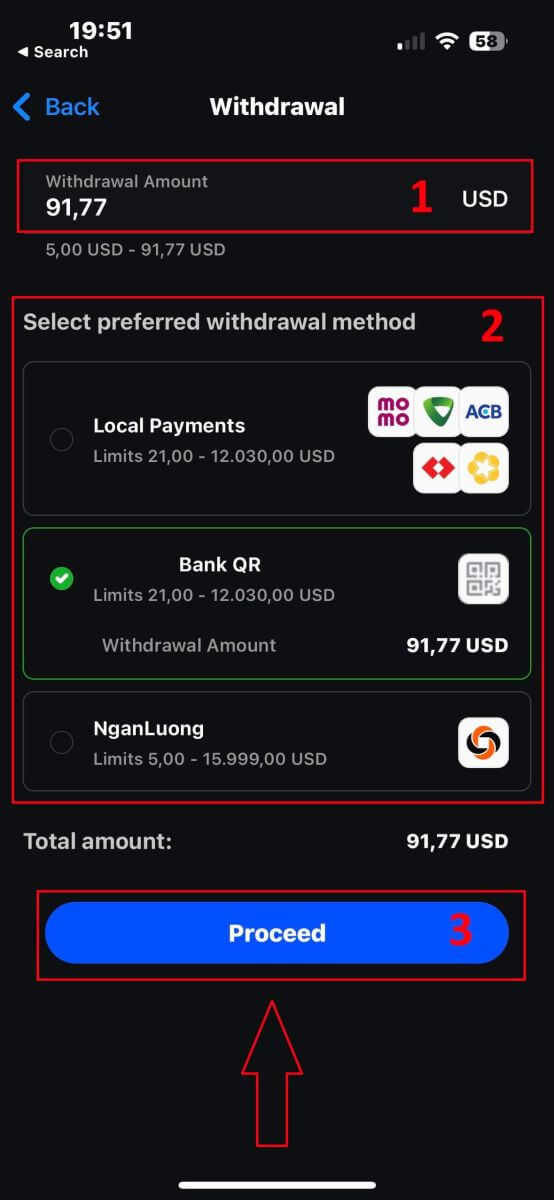
To begin, please open the FxPro Mobile App on your mobile devices, then click the "Withdraw" button in the FxPro Wallet section.
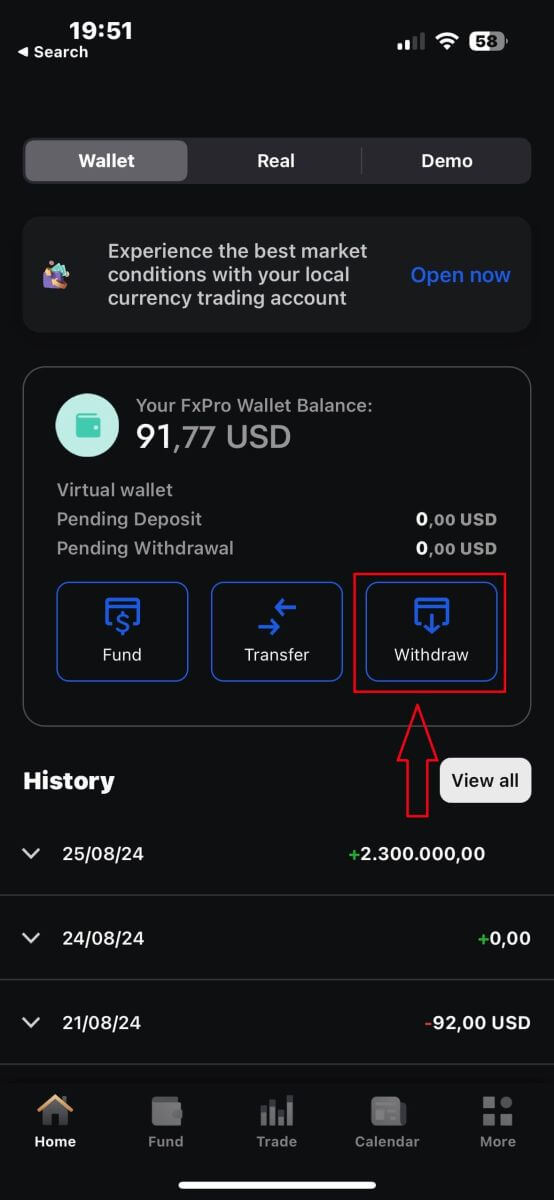
On the next page, you will need to:
-
Fill in the field the amount of money that you wish to withdraw, which must be at least 5.00 USD and less than 15.999 USD, or your FxPro Wallet balance (the minimum and maximum of the withdrawal amount would vary up to the withdrawal method).
-
Please select the payment method that you wish to use. However, please note that you can only choose the ones that you used to deposit (this is mandatory).
Once you finish, please click "Proceed" to go to the next page.
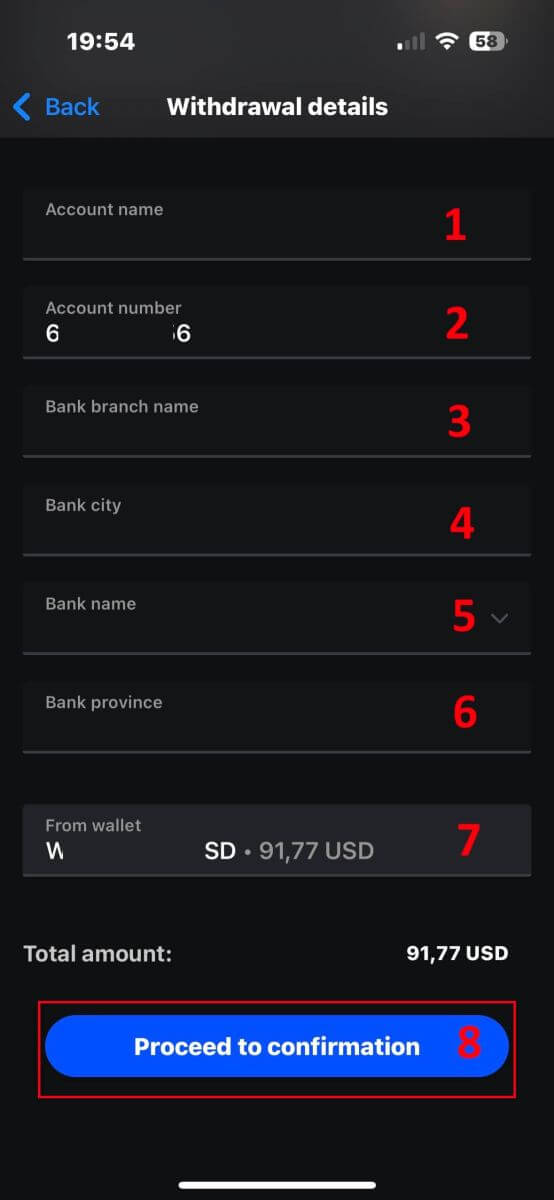
Depending on your withdrawal method, the system would require some necessary information.
With the QR Bank Transfer, we have to provide:
-
Account name.
-
Account number.
-
Bank branch name.
-
Bank city.
-
Bank name.
-
Bank Province.
-
The Wallet you wish to withdraw from.
After carefully checking all the fields and making sure they are correct, please tap the "Proceed to confirmation" to finish the process.
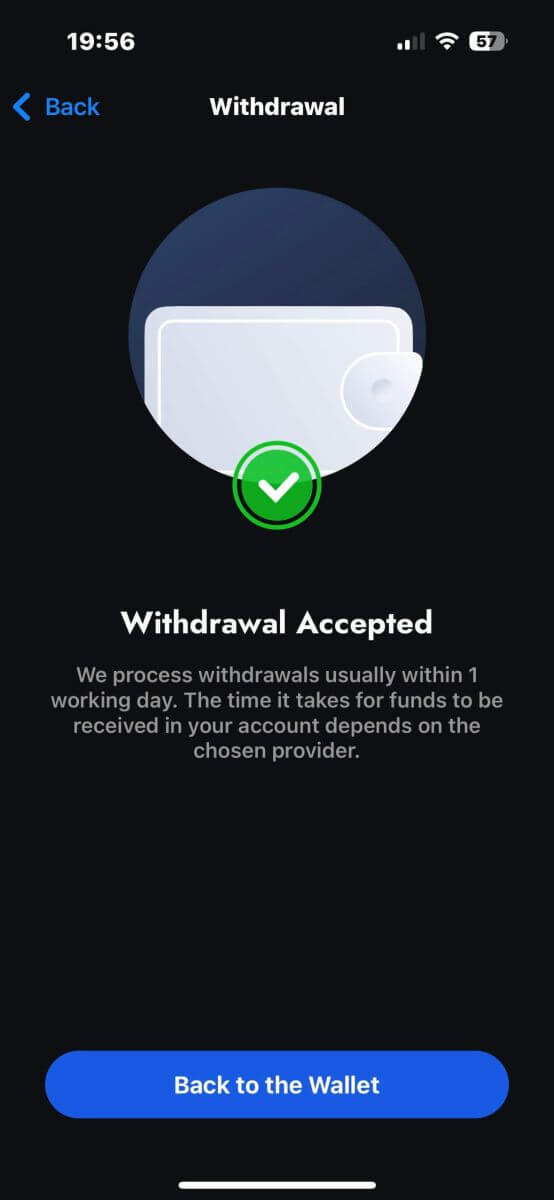
Congratulations! With just a few simple steps, you now can withdraw your funds from the FxPro Wallet so quickly with the mobile app!
Frequently Asked Questions (FAQ)
Can I change my FxPro Wallet (Vault) currency?
To avoid potential conversion fees, your FxPro Wallet should be in the same currency as your deposits and withdrawals.
What conversion rates do you use?
FxPro clients benefit from some of the most competitive exchange rates on the market.
For deposits from an external funding source (i.e., from your credit card to your FxPro Wallet in another currency) and withdrawals to an external funding source ( i.e., from your FxPro Wallet to a credit card in another currency), funds will be converted as per the daily bank rate.
For transfers from your FxPro Wallet to a trading account of a different currency, and vice versa, the conversion will be made as per the rate displayed on the pop-up screen at the time you click confirm.
How long should I wait for my withdrawal to reach my bank account?
Withdrawal requests are processed by our Client Accounting Department within 1 working day. However, the time needed for the funds to be transferred will vary, depending on your payment method.
International Bank Wire withdrawals may take 3-5 working days.
SEPA and local bank transfers may take up to 2 working days.
Card withdrawals may take around 10 working days to reflect
All other payment method withdrawals are usually received within 1 working day.
How long does it take to process my withdrawal request?
During normal working hours, withdrawals are usually processed within a few hours. If the withdrawal request is received outside working hours, it will be processed the next working day.
Bear in mind that once processed by us, the time taken for your withdrawal to reflect will depend on the payment method.
Card withdrawals can take around 10 working days and International Bank Transfers may take 3-5 business days depending on your bank. SEPA and local transfers usually reflect within the same business day, as do e-wallet transfers.
Please note that although card deposits are processed immediately, this does not mean that funds have already been received in our bank account as the bank clearing procure usually takes some days. However, we credit your funds immediately to be able to trade instantly and protect open positions. Unlike deposits, the withdrawal procedure takes longer.
What should I do if I have not received my withdrawal?
If you have made a withdrawal request via Bank Transfer and have not received your funds within 5 working days, please contact our Client Accounting Department at [email protected], and we will provide you with a Swift Copy.
If you have made a withdrawal request via Credit/Debit Card and have not received your funds within 10 working days, please contact our Client Accounting Department at [email protected] and we will provide you with the ARN number.
Conclusion: Fast and Reliable Withdrawals with FxPro
FxPro simplifies the withdrawal process, ensuring you can retrieve your funds with minimal effort. The platform’s focus on security and user convenience means that withdrawing your earnings is as seamless as trading itself. With various withdrawal methods available and a straightforward procedure, FxPro makes sure that accessing your funds is always a smooth and dependable experience.